How to Download TikTok Videos Without Watermark
Published on August 10, 2026 by VaultSave Team
Ask any creator who tries to cross post their content: TikTok watermarks are an absolute nightmare.
You spend forty minutes setting up lighting, shooting ten different takes, syncing your clips to an audio track, adding text overlays, and hitting post. Then you hit the save button so you can drop the exact same video onto Instagram Reels or YouTube Shorts.
You open your camera roll. What do you see?
A giant, semi transparent TikTok logo bouncing from top-left to bottom-right across your face, followed by an obnoxious black end-screen displaying your username.
If you upload that exact file to Reels or Shorts, your reach gets demolished. Meta and YouTube have explicitly confirmed that their discovery algorithms demote clips showing competitor logos. They want their platforms to look original, not like a dumping ground for second-hand TikToks.
Cropping the frame ruins your framing. Blurring out the corners looks unprofessional and sloppy.
The only clean fix is grabbing the raw, un-watermarked source stream directly from the CDN servers before ByteDance renders that logo over your pixels.
Why Does TikTok Slap That Bouncing Logo on Everything?
It comes down to aggressive free user acquisition.
Whenever you download a video natively and text it to a friend or post it on a group chat, TikTok wants everyone looking at that screen to know where the clip originated. They treat your exported media as free billboard space.
When you hit the default "Save video" button inside the official app, several things happen under the hood:
- TikTok pulls the compressed version of your file from their processing cache.
- Their export pipeline burns an animated SVG badge onto the actual pixel data of every frame.
- The badge jumps corners every four to five seconds so you cannot easily crop it out without losing essential parts of the footage.
- An extra 2 second bumper clip gets stitched to the end of the MP4 container.
- The overall visual bitrate gets dialed down so the export finishes in a few seconds on low end cellular connections.
If you just want to text a quick funny clip to your parents, that native save works fine. But if you want to reuse your original camera footage, build a clean portfolio, or edit multiple clips together in CapCut or DaVinci Resolve, that burnt-in graphic completely ruins your work.
How the Web-Based Extraction Method Actually Works
When a creator uploads a video to TikTok, the platform stores multiple copies across edge data centers worldwide.
One of those copies is the clean, high-bitrate source file. The watermark you see bouncing around your phone screen is simply an overlay rendered on top of the video player layer inside the mobile app.
When you paste a link into VaultSave TikTok Downloader, our backend bypasses that front-end rendering layer. It queries the raw video manifest, strips out the tracking parameters attached to your user session, and locates the direct CDN route serving the untouched MP4 file.
You receive the exact file delivered from the content server without any added compression or branding overlays.
Step-by-Step: Pulling Clean MP4s on Any Device
You do not need to install dodgy utility apps from the App Store, pay for shady subscriptions, or install sketchy browser extensions.
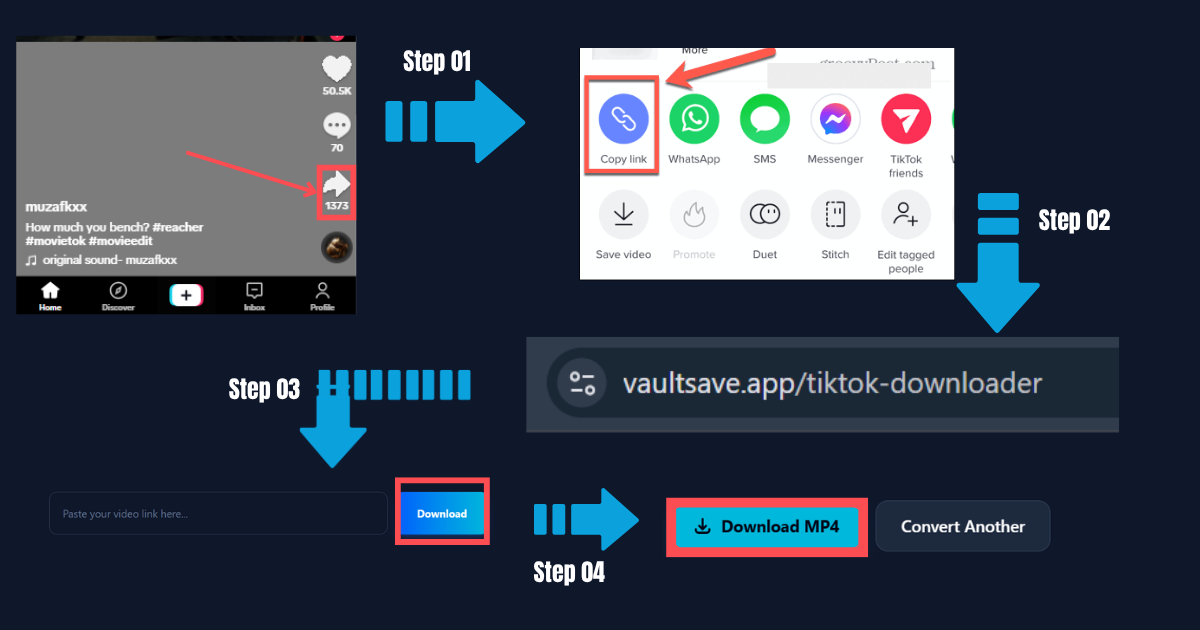
1. Copy the Public Video Link
Grab your phone and open TikTok. Find the clip you want to keep.
Hit the Share button on the right side of your screen (it looks like a little white curved arrow). When the share drawer slides up from the bottom, look for the gray circular icon labeled Copy link. Tap it. Your phone clipboard now holds the full URL.
If you are browsing on a desktop computer, it is even simpler. Just copy the URL directly out of your browser address bar while viewing the video.
2. Open the Downloader Tool
Open Safari, Google Chrome, Brave, Firefox, or whatever browser you have on your device.
Navigate over to VaultSave TikTok Downloader. You will spot a clean search input box right in the center of the screen.
Tap inside the input box, hold for a moment, and hit Paste. Then click the bright blue Download button.
3. Fetch the Clean Media Stream
The parser takes about one to two seconds to scan the page link, locate the original CDN video path, and generate a clean output link.
4. Save the MP4 Directly to Storage
Once the green or blue download buttons populate, saving the file depends on what hardware you are holding:
- On an iPhone (iOS Safari): Tap Download MP4. Safari will pop open a native dialogue box asking: "Do you want to download this file?" Tap Download. Look up at your browser address bar you will notice a tiny blue download arrow icon. Tap it, select the file, hit the iOS Share icon in the lower-left corner, and pick Save Video. The file jumps straight into your standard Apple Photos app.
- On Android (Google Chrome): Tap Download MP4. Chrome automatically routes the file directly into your device's primary
Downloadsdirectory. Open Google Photos or your default system Gallery app, and the fresh clip will be waiting right at the top of your recent media feed. - On PC or Mac: Click the download button, pick your storage folder, and hit save. You now have a clean local copy ready for any desktop editing suite.
Comparing the Approaches: In-App Save vs. VaultSave
| Parameter | Official In-App Download | VaultSave Web Extractor |
|---|---|---|
| Watermark Presence | Persistent bouncing logo & bumper | 100% clean video frame from start to finish |
| Reels & Shorts Discovery | Heavily penalized by rival algorithms | Full algorithmic reach without suppression flags |
| Output Bitrate | Frequently recompressed to 720p | Original server bitrate (up to full 1080p) |
| Audio Track Quality | Standard AAC mobile stream | Direct source audio embedded with zero quality loss |
| Hardware Compatibility | Restricted strictly to mobile apps | Universal access across iOS, Android, PC, Mac, Linux |
| Personal Privacy | Linked to your logged-in TikTok profile | Completely anonymous with zero authentication needed |
Why Installing Dedicated "Downloader Apps" Is a Huge Mistake
Go type "TikTok saver" into the Google Play Store or Apple App Store. You will see dozens of standalone mobile utilities promising clean video downloads.
Steer clear of them. Almost every single one of those apps relies on predatory tactics:
- Account Phishing & Session Hijacking: Many of these apps load an internal browser frame demanding that you log into your personal TikTok account before downloading anything. Doing that gives unknown developers access to your session tokens, passwords, and private profile data. Your account can get flagged, spam shadowbanned, or stolen within hours.
- Aggressive Ad Bombardment: Most free mobile apps lock downloads behind multiple 30 second unskippable video ads, full-screen popups, and fake "update your phone" alerts.
- Background Battery & Storage Drain: A utility that simply extracts an MP4 file has no business taking up 120MB of storage space on your device or running persistent background telemetry services that chew through your battery life.
Browser-based web utilities like VaultSave require zero installations, request zero system permissions, and leave zero cache junk lingering on your mobile storage.
When a Download Link Errors Out (How to Fix It)
Web extractors work seamlessly 98% of the time, but edge cases do happen. If a download fails to trigger, run through this quick checklist:
- The Account Is Locked to Private: Automated scraping tools cannot inspect private accounts. If a creator restricts their profile so only approved followers can see their clips, web downloaders cannot fetch that media endpoint. The target clip must be published publicly.
- Link Format Issues: Sometimes copying a link from certain third-party messaging apps appends tracking junk (like
?_t=...or&sender_device=...) that confuses older parsers. VaultSave automatically cleans these parameters, but if an error occurs, try copying the clean link again straight from TikTok's native share drawer. - Regional Sound Blocks: Occasionally, a record label blocks specific audio stems in certain countries. If TikTok's edge servers restrict that content based on server geography, the stream extraction might timeout.
- Periodic CDN Updates by ByteDance: TikTok regularly updates its media endpoint signatures and tokens to curb automated scraping. Whenever an update rolls out, our developer team pushes an upstream parser update within hours to keep URL resolution running smoothly.
Ready to download your video?
Paste any link into VaultSave and start downloading in HD.
Go to Downloader